GPIO
Luckfox Lume is based on the Allwinner T153 chip. This chapter explains how to access and control GPIO through the sysfs filesystem.
1. GPIO Subsystem Overview
GPIO (General-Purpose Input/Output) pins are programmable digital pins controlled by the processor. They can output high or low levels and detect external input levels. Pin multiplexing also allows them to serve peripheral functions such as UART, I2C, and SPI.
The Linux kernel provides a dedicated GPIO subsystem driver framework to manage the processor's GPIO resources. This framework allows developers to operate pins in kernel-space drivers or expose GPIO pins for user-space control.
User-space applications can read and write GPIO pins through the sysfs filesystem interface. Output pins can control peripherals such as LEDs and relays. Input pins can read logic levels and support edge detection for applications such as buttons and external sensor events. The GPIO subsystem provides flexible, programmable control over these pins.
For details on the Linux GPIO subsystem implementation, see the kernel source documentation: <Linux_kernel_source>/Documentation/driver-api/gpio/
2. GPIO Control (Shell)
2.1 Pinout
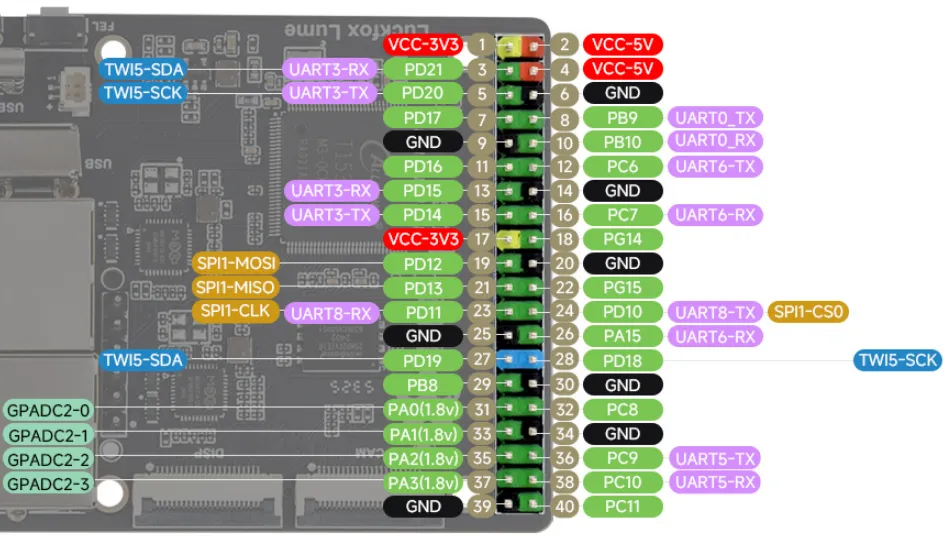
2.2 Calculating GPIO Numbers
The T153 main GPIO controller reserves 32 line numbers per bank:
PA = 0, PB = 1, PC = 2, PD = 3, ...
line = bank_index * 32 + pin_index
For example, PD16 = 3 * 32 + 16 = 112.
2.3 Using the GPIO sysfs Interface
-
Using physical pin 11 (
PD16, line number 112) as an example, export the GPIO from kernel space to user space:echo 112 > /sys/class/gpio/exportls /sys/class/gpio/gpio112 -
After a successful export,
/sys/class/gpio/gpio112/is created:active_low direction power ueventdevice edge subsystem value -
Unexport the GPIO to remove user-space control:
echo 112 > /sys/class/gpio/unexport
2.4 Device Directories and Attributes
- Writing a GPIO's global number to
/sys/class/gpio/exportrequests the GPIO and creates a user-space control node. It does not forcibly release a pin already used by another driver. If the pin is occupied, the operation may returnDevice or resource busy. After exporting the pin, use the attribute files in/sys/class/gpio/gpio<number>to configure its direction and read or write its level.root@luckfox:~# ls /sys/class/gpio/export gpiochip0 gpiochip400 gpiochip704 gpio112 unexport - A successful export creates the
/sys/class/gpio/gpio<N>device directory, where N is the global GPIO number. This directory contains readable and writable attributes for configuring the GPIO and controlling its level from user space.root@luckfox:~# ls /sys/class/gpio/gpio112/active_low direction power ueventdevice edge subsystem value- direction: Controls the GPIO direction. Write
into configure input mode oroutto configure output mode. - value: Represents the GPIO logic level. In input mode, read this file to obtain the current level. In output mode, write
1or0to set the output high or low. The logic is affected by theactive_lowattribute. - active_low:
0selects normal logic and1selects inverted logic. The expected high and low levels in this chapter assume thatactive_lowis0for both GPIO pins. The examples do not modify this attribute. - edge: Configures edge detection and is valid only in input mode. After selecting an edge trigger, applications can use
poll()orselect()to monitor level changes. Configuring the edge attribute alone does not invoke a hardware interrupt callback.rising: Trigger on a rising edgefalling: Trigger on a falling edgeboth: Trigger on both edgesnone: Disable edge detection
- direction: Controls the GPIO direction. Write
2.5 Controlling the Output Level
- Set the direction:
cd /sys/class/gpio/gpio112echo out > direction # Configure GPIO as outputecho in > direction # Configure GPIO as input
- Set the value attribute to control the GPIO level:
cat valueecho 0 > valueecho 1 > value
2.6 Reading the Input Level
cd /sys/class/gpio/gpio112
echo in > direction
cat value
3. GPIO Control (Python)
-
Example program: Perform a hardware loopback test using two GPIO pins. PC7 outputs high and low levels, and PD16 reads the input level. Both the Python and C examples use the following Lume wiring. With power disconnected, connect physical pins 16 and 11 together.
Function Global GPIO Line Number Lume GPIO 40-Pin Header Physical Pin Output 71 PC7 16 Input 112 PD16 11 #!/usr/bin/env python3from pathlib import Pathimport timeOUT_PIN = 71IN_PIN = 112SYSFS_ROOT = Path("/sys/class/gpio")def gpio_export(line: int) -> bool:gpio_dir = SYSFS_ROOT / f"gpio{line}"if gpio_dir.exists():print(f"gpio {line} already exported, reusing")return False(SYSFS_ROOT / "export").write_text(str(line))time.sleep(0.1)return Truedef gpio_unexport(line: int):path = SYSFS_ROOT / "unexport"if (SYSFS_ROOT / f"gpio{line}").exists():path.write_text(str(line))def gpio_set_dir(line:int, direction:str):p = SYSFS_ROOT / f"gpio{line}" / "direction"p.write_text(direction)def gpio_set_value(line:int, val:int):p = SYSFS_ROOT / f"gpio{line}" / "value"p.write_text(str(val))def gpio_read_value(line:int) -> int:p = SYSFS_ROOT / f"gpio{line}" / "value"return int(p.read_text().strip())out_owned = gpio_export(OUT_PIN)in_owned = gpio_export(IN_PIN)try:gpio_set_dir(OUT_PIN, "out")gpio_set_dir(IN_PIN, "in")print(f"Loop‑back test start: OUT={OUT_PIN}, IN={IN_PIN}")print(f"Short {OUT_PIN} <--> {IN_PIN}\n")while True:gpio_set_value(OUT_PIN, 1)read_back = gpio_read_value(IN_PIN)print(f"HIGH, hardware readback = {read_back}")time.sleep(0.5)gpio_set_value(OUT_PIN, 0)read_back = gpio_read_value(IN_PIN)print(f"LOW, hardware readback = {read_back}")time.sleep(0.5)except KeyboardInterrupt:print("\nUser stop test.")finally:gpio_set_value(OUT_PIN,0)if out_owned: gpio_unexport(OUT_PIN)if in_owned: gpio_unexport(IN_PIN) -
Open and configure the GPIO pins:
out_owned = gpio_export(OUT_PIN)in_owned = gpio_export(IN_PIN)gpio_set_dir(OUT_PIN, "out")gpio_set_dir(IN_PIN, "in")The program exports PC7 and PD16, then configures PC7 as an output and PD16 as an input:
gpio_export(line): Checks for thegpio<line>directory. If it already exists (exported by another program), prints a message and returnsFalsewithout taking ownership. Otherwise, writes the line number toexport, waits 0.1 seconds, and returnsTrue.gpio_set_dir(line, direction): Writesoutorinto the correspondingdirectionfile.Path.write_text(): Opens the attribute file, writes the text, and closes the file.
-
Control the output and read the input:
gpio_set_value(OUT_PIN, 1)read_back = gpio_read_value(IN_PIN)print(f"HIGH, hardware readback = {read_back}")time.sleep(0.5)gpio_set_value(OUT_PIN, 0)read_back = gpio_read_value(IN_PIN)print(f"LOW, hardware readback = {read_back}")time.sleep(0.5)gpio_set_value()converts the integer to text and writes it to PC7'svaluefile.gpio_read_value()reads PD16'svaluefile. -
Stop the test and release resources:
except KeyboardInterrupt:print("\nUser stop test.")finally:gpio_set_value(OUT_PIN, 0)if out_owned: gpio_unexport(OUT_PIN)if in_owned: gpio_unexport(IN_PIN)Press Ctrl+C to stop the loop. Before exiting, drive the output pin low, then unexport only the GPIOs owned by this program to avoid disrupting GPIOs controlled by other programs.
-
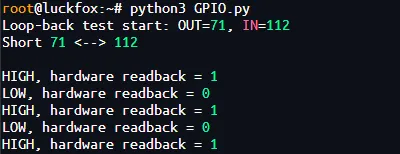
Run the Python program:
python3 GPIO.pyOutput:
4. GPIO Control (C)
-
Complete code:
#define _DEFAULT_SOURCE#include <errno.h>#include <fcntl.h>#include <signal.h>#include <stdio.h>#include <stdlib.h>#include <string.h>#include <unistd.h>#define OUT_LINE 71#define IN_LINE 112static volatile sig_atomic_t stop_test = 0;struct gpio_pin {int line;int owned;int output;char value_path[80];};static void stop_handler(int sig){(void)sig;stop_test = 1;}static int write_text(const char *path, const char *text){int fd = open(path, O_WRONLY);if (fd < 0) {perror(path);return -1;}size_t size = strlen(text);ssize_t count = write(fd, text, size);int saved_errno = errno;if (count != (ssize_t)size) {close(fd);errno = count < 0 ? saved_errno : EIO;perror(path);return -1;}if (close(fd) < 0) {perror(path);return -1;}return 0;}static int open_gpio(struct gpio_pin *pin, const char *direction){char path[80], number[16];snprintf(path, sizeof(path), "/sys/class/gpio/gpio%d", pin->line);if (access(path, F_OK) == 0) {fprintf(stderr, "GPIO%d already exported; check its owner\n",pin->line);return -1;}snprintf(number, sizeof(number), "%d", pin->line);if (write_text("/sys/class/gpio/export", number) < 0)return -1;pin->owned = 1;snprintf(path, sizeof(path), "/sys/class/gpio/gpio%d/direction",pin->line);for (int i = 0; i < 100 && access(path, F_OK) != 0; ++i)usleep(1000);if (write_text(path, direction) < 0)return -1;pin->output = strcmp(direction, "out") == 0;snprintf(pin->value_path, sizeof(pin->value_path),"/sys/class/gpio/gpio%d/value", pin->line);return 0;}static int read_gpio(const struct gpio_pin *pin, int *value){char c;int fd = open(pin->value_path, O_RDONLY);if (fd < 0) {perror(pin->value_path);return -1;}ssize_t count = read(fd, &c, 1);int saved_errno = errno;close(fd);if (count != 1 || (c != '0' && c != '1')) {errno = count < 0 ? saved_errno : EIO;perror(pin->value_path);return -1;}*value = c == '1';return 0;}static int close_gpio(struct gpio_pin *pin){char number[16];int result = 0;if (!pin->owned)return 0;if (pin->output && write_text(pin->value_path, "0") < 0)result = -1;snprintf(number, sizeof(number), "%d", pin->line);if (write_text("/sys/class/gpio/unexport", number) < 0)result = -1;pin->owned = 0;return result;}int main(void){struct gpio_pin out_pin = { .line = OUT_LINE };struct gpio_pin in_pin = { .line = IN_LINE };int result = EXIT_FAILURE;int read_back;signal(SIGINT, stop_handler);setvbuf(stdout, NULL, _IOLBF, 0);if (open_gpio(&in_pin, "in") < 0)goto cleanup;if (stop_test) {result = EXIT_SUCCESS;goto cleanup;}if (open_gpio(&out_pin, "out") < 0)goto cleanup;while (!stop_test) {if (write_text(out_pin.value_path, "1") < 0 ||read_gpio(&in_pin, &read_back) < 0)goto cleanup;printf("HIGH, hardware readback = %s\n",read_back ? "True" : "False");usleep(500000);if (stop_test)break;if (write_text(out_pin.value_path, "0") < 0 ||read_gpio(&in_pin, &read_back) < 0)goto cleanup;printf("LOW, hardware readback = %s\n",read_back ? "True" : "False");usleep(500000);}result = EXIT_SUCCESS;cleanup:if (stop_test)puts("\nUser stop test.");if (close_gpio(&out_pin) < 0)result = EXIT_FAILURE;if (close_gpio(&in_pin) < 0)result = EXIT_FAILURE;return result;} -
Export the pins to user space.
open_gpio()is called for input line 112 first, followed by output line 71:if (access(path, F_OK) == 0) {fprintf(stderr, "GPIO%d already exported; check its owner\n",pin->line);return -1;}snprintf(number, sizeof(number), "%d", pin->line);if (write_text("/sys/class/gpio/export", number) < 0)return -1;pin->owned = 1;write_text()usesopen(),write(), andclose()to access sysfs files, checking the open result, write length, and close result. On failure, it reports the cause withperror()and returns -1. AnEBUSYerror caused by kernel ownership is also treated as an error rather than forcing control of the pin. -
Configure the GPIO direction:
if (open_gpio(&in_pin, "in") < 0)goto cleanup;if (open_gpio(&out_pin, "out") < 0)goto cleanup;PD16 is the input and PC7 is the output. Configure the input first. If initialization fails partway through, the cleanup routine still runs to avoid leaving GPIO pins exported.
-
Control the output level and read the input:
if (write_text(out_pin.value_path, "1") < 0 ||read_gpio(&in_pin, &read_back) < 0)goto cleanup;printf("HIGH, hardware readback = %s\n",read_back ? "True" : "False");usleep(500000); -
Unexport the pins:
if (close_gpio(&out_pin) < 0)result = EXIT_FAILURE;if (close_gpio(&in_pin) < 0)result = EXIT_FAILURE;return result; -
Cross-compile: The Luckfox Lume SDK uses an ARM32 toolchain.
export PATH=<Luckfox_Lume_SDK>/out/toolchain/gcc-linaro-11.3.1-2022.06-x86_64_arm-linux-gnueabihf/bin:$PATHCompile the program:
arm-linux-gnueabihf-gcc -Wall -Wextra -O2 GPIO.c -o GPIOfile GPIO -
Transfer and run:
scp GPIO root@<LUME_IP>:/root/Replace
<LUME_IP>with the board's IP address, such as192.168.9.152. The destination path on the board is/root/GPIO. -
Run the C program:
chmod +x /root/GPIO/root/GPIOOutput:
